Monitor
Monitor ranks the whole market by a volatility metric and keeps the top of that ranking on screen. Where Knives waits for something to cross a line and then tells you, Monitor is a continuously sorted leaderboard.
All readings are based on 5-minute candles.
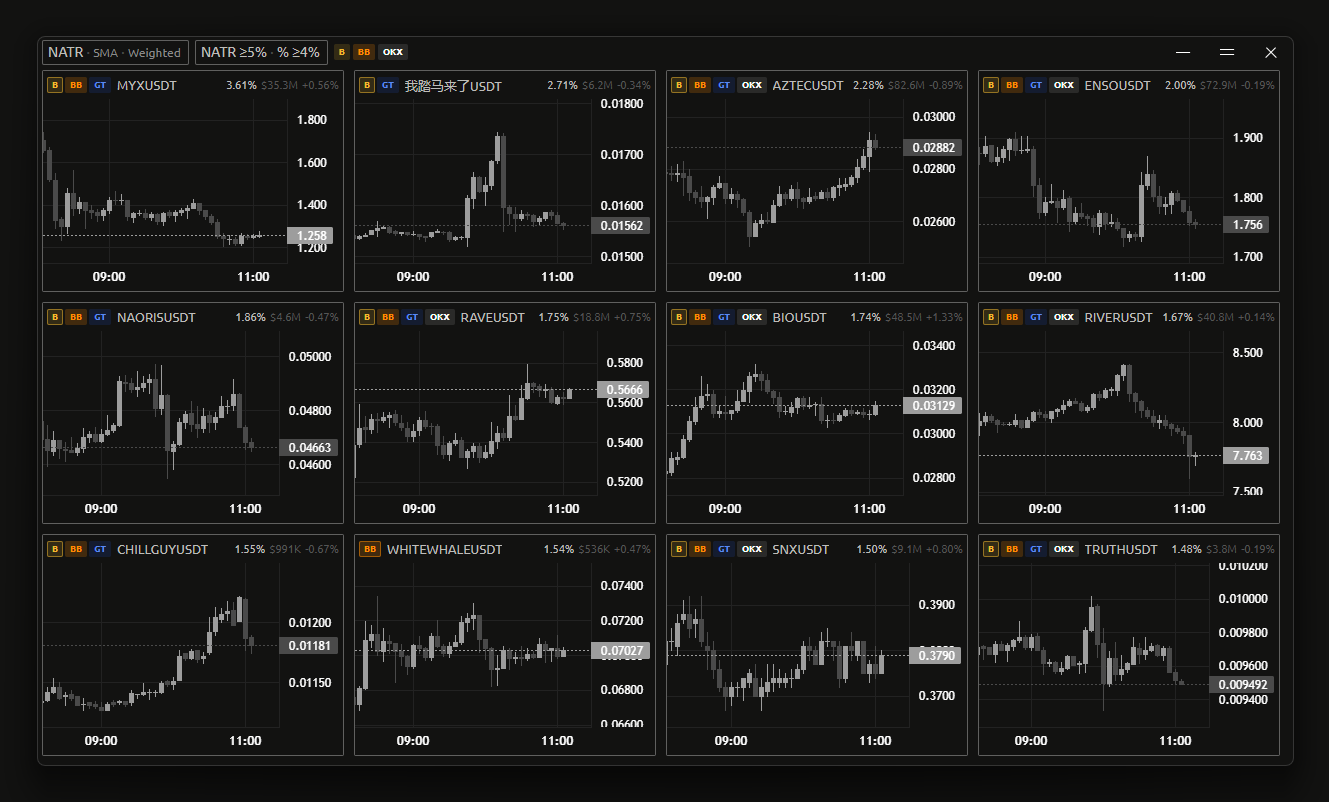
Reading the window
Titlebar
The titlebar is a live summary of the settings currently in effect:
- 5m — the candle timeframe. Fixed.
- NATR | Vol | Chg — the active sort. These are buttons: click to re-sort without opening settings.
- Sort detail — what the current sort is doing. For NATR it shows the smoothing method and aggregation mode (e.g.
SMA · Weighted); for Volume, the source and type (e.g.Total · 75m); for % Change, just% Change. If a minimum volume filter is active it is appended asmin $<amount>. - Alert thresholds —
NATR ≥x% · % ≥y%. Dimmed when the alert sound is off. - Exchange icons — the enabled exchanges, in priority order.
- Disconnected — shown if the data connection drops.
A ticker card
Each card shows the ticker, the exchanges it is listed on, and three metrics:
| Metric | Meaning |
|---|---|
| NATR | Volatility — normalised average true range, on 5m candles |
| Volume | Trading volume in USD, over the window set by Volume type |
| % Change | Price change over 5m |
Hovering an exchange logo reads Listed on <exchange>. Cards have an expand button that opens a fullscreen chart with the same drawing tools as the Analyzer.
What the colors mean
Coloring is driven by the metric color rules, which are independent of the alert thresholds:
- NATR shifts from its level-1 color to its level-2 color as volatility rises past each level.
- % Change is colored by direction — one pair of colors for positive moves, another for negative — and also steps up at level 2.
If dynamic colors are switched off for a metric, that metric instead highlights plainly when it crosses its alert threshold.
Settings
Open the Monitor tab in the main window.
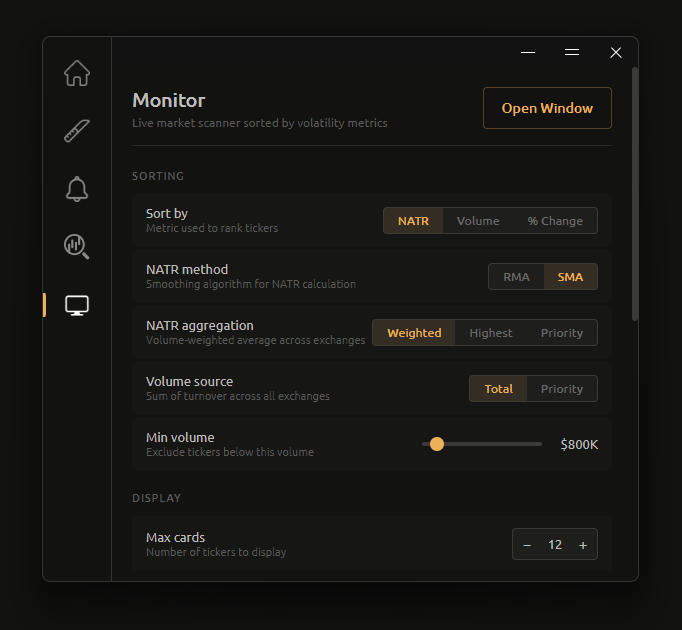
Sorting
Sort by
Which metric ranks the list: NATR, Volume or % Change. Default NATR.
NATR method
The smoothing algorithm used to calculate NATR. Default SMA.
- RMA — Wilder's moving average. Smoother, slower to react.
- SMA — simple moving average. More responsive to recent candles.
NATR aggregation
How one NATR figure is produced for a ticker listed on several exchanges. Default Weighted.
- Weighted — volume-weighted average across exchanges.
- Highest — the maximum NATR across all exchanges.
- Priority — the value from the first exchange in your priority order that has data for that ticker.
Volume source
Where the volume figure comes from. Default Total.
- Total — turnover summed across all enabled exchanges.
- Priority — turnover from the first exchange in priority order only.
Volume type
Which window the volume figure covers. Default 75m.
- 75m — 75-minute rolling volume.
- 5m — the current 5-minute candle's volume.
This setting also picks which volume filter is live
Monitor has two minimum-volume sliders, and only the one matching the current Volume type does anything:
- Volume type 75m → the Min volume (75m) slider filters the list.
- Volume type 5m → the Min volume (5m) slider filters the list.
The other slider keeps its value but is inert. If you set a filter and see no effect, check that Volume type matches the slider you moved. The titlebar's min $… readout always shows the one actually in force.
Min volume (75m)
Excludes tickers below this 75-minute volume. Range $0 to $100M in $1M steps, default 0 — displayed as None, meaning no filtering.
Min volume (5m)
Excludes tickers below this 5-minute candle volume. Range $0 to $10M in $100K steps, default 0 (None).
Display
Max cards
How many ticker cards to display. Range 3 to 30, default 12. The list re-ranks live as you change it.
Metric colors
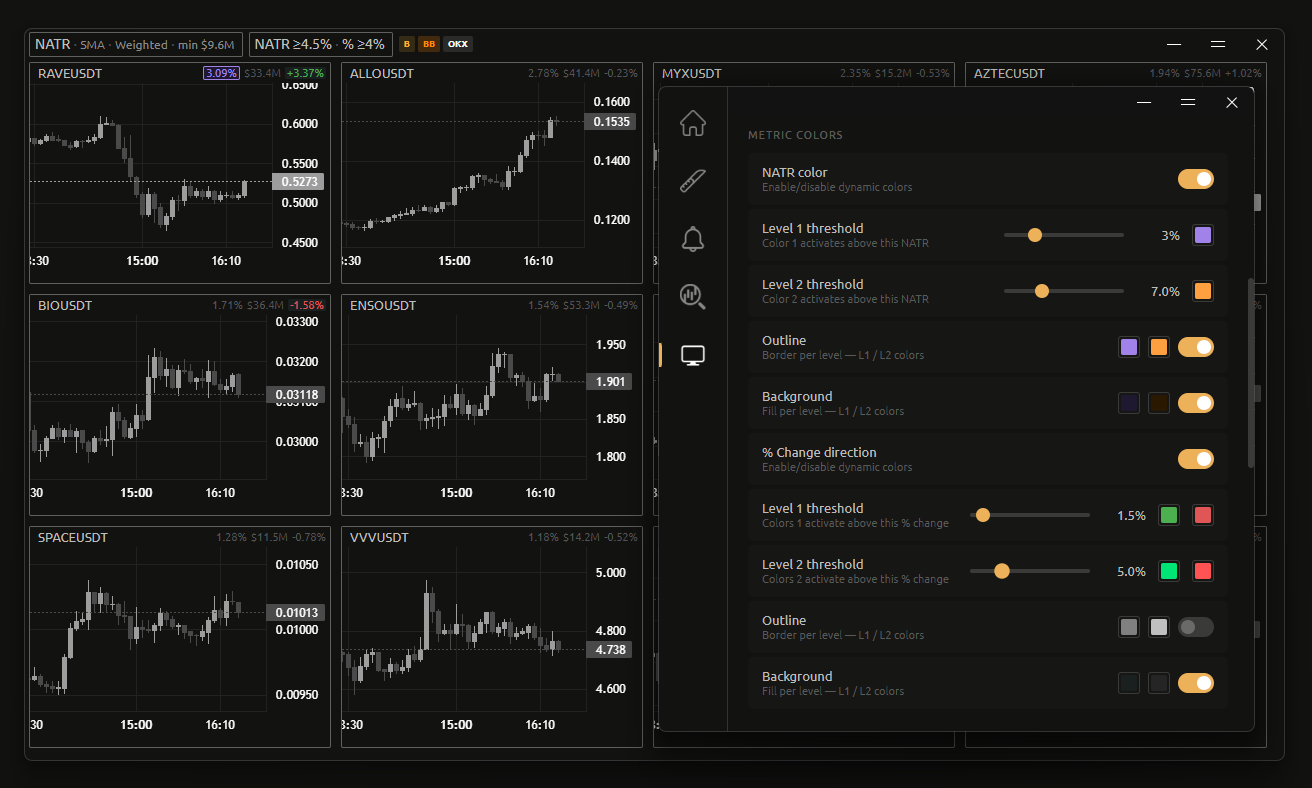
Two metrics have configurable dynamic colors: NATR and % Change. Each has a master toggle, two thresholds, and colors for text, outline and background.
NATR color
Master switch for NATR's dynamic coloring. On by default. Off makes NATR use the plain highlight-on-alert-threshold behaviour instead.
| Setting | What it does | Range | Default |
|---|---|---|---|
| Level 1 threshold | NATR above this uses color 1 | 1–10%, 0.5 steps | 3% (#A082E8) |
| Level 2 threshold | NATR above this uses color 2 | 1.5–10%, 0.5 steps | effective 7% (#FFA040) |
| Outline | Border color per level, plus an on/off toggle | — | off |
| Background | Fill color per level, plus an on/off toggle | — | off |
Level 2 is additive
The value shown next to the Level 2 slider is Level 1 + Level 2, not the slider's own value. With Level 1 at 3% and the Level 2 slider at 4%, the label reads 7.0% — that is where color 2 actually starts.
The same is true of the % Change level 2 slider. Read the label, not the slider.
Outline and background are separate toggles with their own level-1 and level-2 colors, so you can have colored text only, a colored border, a filled card, or any combination.
% Change direction
Master switch for % Change's dynamic coloring. On by default.
It works like NATR but with two colors per level — one for positive moves, one for negative:
| Setting | Range | Default |
|---|---|---|
| Level 1 threshold | 1–10%, 0.5 steps | 2% — positive #4CAF50, negative #E05555 |
| Level 2 threshold | 1.5–10%, 0.5 steps | effective 5% — positive #00E676, negative #FF5252 |
| Outline | — | off |
| Background | — | off |
Exchange icons
Show icons
Shows or hides the exchange logos on ticker cards. On by default.
Exchanges
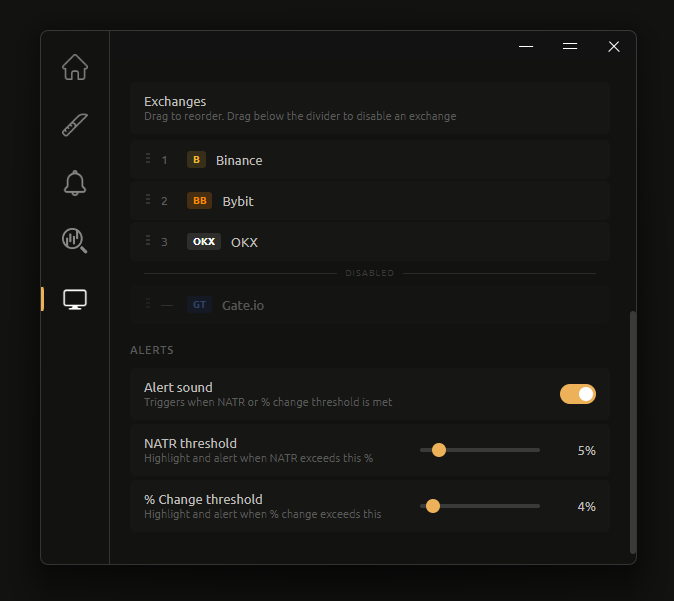
A single drag-to-reorder list handles both priority and enablement, split by a divider:
- Above the divider — enabled, numbered by rank. Rank matters for the
Priorityoptions in NATR aggregation and Volume source. - Below the divider — disabled. Their rank shows as
—and they contribute no data.
Drag an exchange across the divider to enable or disable it. All five are enabled by default, in the order Binance, Bybit, OKX, Gate.io, Hyperliquid.
INFO
Monitor's default priority order differs from Knives' (Bybit, Binance, Gate.io, OKX, Hyperliquid). The two tools keep separate priority lists — reordering one does not affect the other.
Alerts
Alert sound
Plays a sound when a ticker meets the NATR or % Change threshold below. On by default. When off, the titlebar's threshold readout is dimmed.
NATR threshold
Highlights and alerts when NATR exceeds this percentage. Range 3% to 20% in 0.5% steps, default 5%.
% Change threshold
Highlights and alerts when % change exceeds this. Range 3% to 20% in 0.5% steps, default 4%.
Thresholds and colors are separate systems
The alert thresholds here decide when a sound fires. The metric color levels decide how a value is drawn. They are configured independently and can be set to different values — a card can be colored without having triggered a sound, and vice versa.
Related
- Knives — trigger-based feed rather than a ranking
- Analyzer — full chart workspace
- Charts & drawing — candle colors used by Monitor's charts