Knives
Knives is a price movement scanner. It watches every ticker on every exchange you enable, and surfaces a card the moment one of them moves further than a threshold you set — up or down.
All of its readings are based on the current 5-minute candle. A ticker appears because this candle has moved, not because of a 24-hour figure.
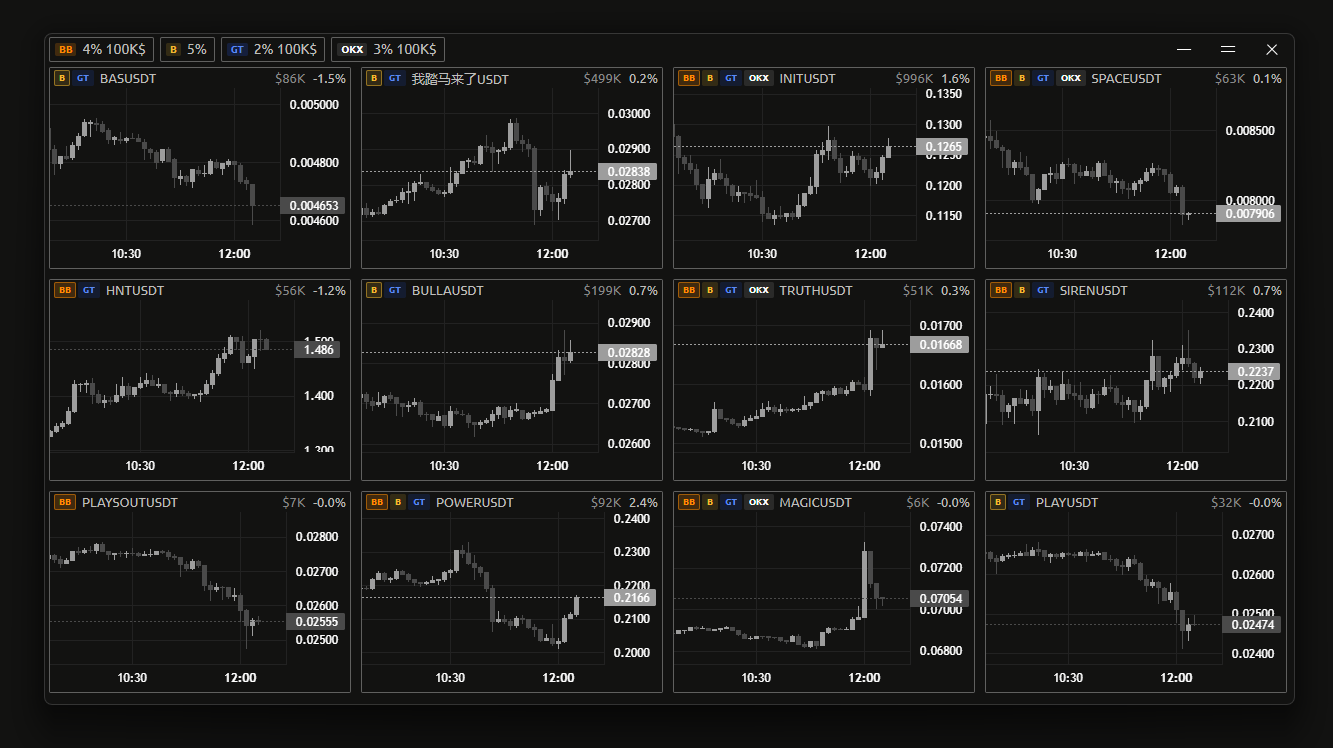
Reading the window
Before anything triggers
When nothing has crossed a threshold yet, the window shows its listening state instead of cards:
- Listening — a pulsing label, followed by one entry per enabled exchange showing that exchange's icon, its trigger percentage, and its volume threshold if the volume filter is on for it. This is a live summary of what Knives is currently armed to catch.
- No exchanges armed — every exchange is disabled. Nothing can trigger. Enable at least one in the settings panel.
A ticker card
Each card has a header row and a mini chart beneath it.
In the header, left to right:
- Exchange icons — which exchanges the ticker is listed on. Hovering one shows
Listed on <exchange>. These can be hidden entirely; see Show icons. - NEW badge — the ticker was listed within the last 60 seconds. The badge is colored by the exchange that listed it, and hovering shows which one. It disappears once the ticker is more than a minute old.
- Ticker symbol — click it to copy the symbol to your clipboard. It briefly reads
Copied!to confirm.
On the right:
- Volume — the current 5m candle's volume in USD. Only shown when volume display is on; see Show volume.
- Price change — the current 5m candle's percent change, signed.
- Expand button — opens the ticker fullscreen.
What the colors mean
A card colors its percentage and its header stripe green or red once the current candle's move has reached that exchange's % Change trigger. Below the trigger, the reading stays neutral.
So the color is not "price is up" — it is "this move is at or beyond the level you asked to be told about". A card can be present and still show a neutral reading if it has since pulled back below the threshold.
Direction is judged per exchange
The threshold used for coloring is the one belonging to the exchange the card came from. If you have set different % Change values per exchange, two cards showing the same percentage can be colored differently.
Fullscreen
The expand button opens a single ticker at full window size with a larger chart and a timeframe selector offering 1m, 5m, 15m, 30m, 1h, 4h, 1d and 1w.
You can star timeframes in the dropdown to pin them as a quick-access row next to the selector. Favourites are shared with the other tools' fullscreen chart views.
Settings
Open the Knives tab in the main window.
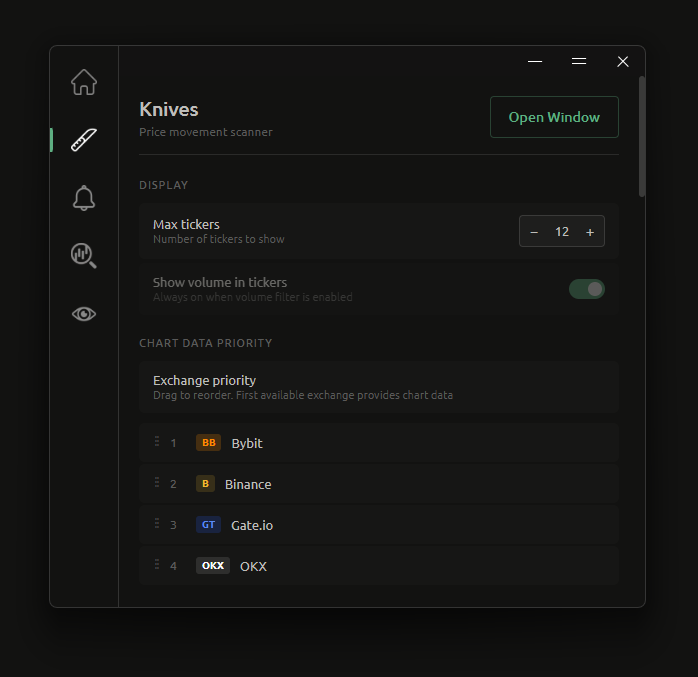
Display
Max tickers
How many ticker cards the window shows at once. Range 3 to 66, default 12.
Show volume in tickers
Displays the volume figure in each card's header.
This toggle is forced on and locked whenever the volume filter is enabled for any exchange — if you are filtering by volume, Knives always shows you the volume it filtered on. Its description changes to Always on when volume filter is enabled to indicate this. Turn every exchange's volume filter off to get the toggle back.
Chart data priority
Exchange priority
A drag-to-reorder list of all five exchanges. Drag an entry up or down with the mouse to change its rank.
This controls which exchange supplies the mini chart's candles when a ticker is listed on more than one. The first exchange in the list that is enabled and has the ticker wins.
It does not affect which exchanges can trigger an alert — that is the per-exchange Enable toggle below.
Exchange icons
Show icons
Shows or hides the exchange icons on every ticker card. Off gives you a denser, plainer card; on tells you at a glance where a ticker trades.
Per-exchange settings
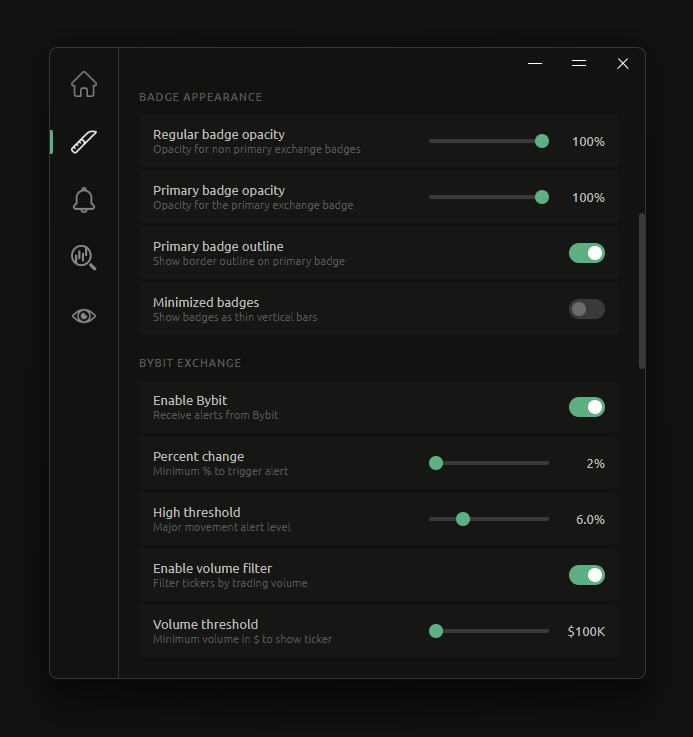
Knives has an identical settings block for each of Bybit, Binance, Gate.io, OKX and Hyperliquid. Every exchange is configured independently — thresholds, volume filters and enablement are all per exchange.
Enable <exchange>
Whether Knives receives alerts from this exchange at all. Off means the exchange is not scanned, and its tickers cannot produce cards. All five default to on.
Disabling an exchange greys out the rest of that block.
% Change
The move, on the current 5m candle, that triggers an alert for this exchange. Range 2% to 10% in 0.5% steps, default 2%.
This is the primary threshold. It also decides when a card's reading turns green or red.
High threshold
Intended as the level that counts as a major move for this exchange. Range 2% to 10% in 0.5% steps, default 6%.
The value displayed next to the slider is % Change + High threshold, not the slider's own value — with % Change at 2% and the slider at 6%, the label reads 8.0%. Read the label, not the slider position.
TODO — verify before relying on this slider
In the current build this slider does not appear to affect anything.
It writes a per-exchange value that the Knives window never reads back. The major-movement sound is instead triggered by an older setting that has no control in the interface. The actual condition is:
|price change| ≥ (legacy global high threshold) + (this exchange's % Change)
where the legacy global value is 8 unless an older version of the app changed it. So with % Change at 2%, the sound currently fires at 10% no matter where this slider sits.
I have not written this up as intended behaviour, because I can't tell whether the slider is meant to drive the sound and is reading the wrong field, or is meant to do something else. Confirm which, and this section can be rewritten.
Enable volume filter
Filters this exchange's tickers by trading volume, so low-liquidity moves never reach you. Off by default.
Turning this on for any exchange also forces Show volume in tickers on.
Volume threshold
The minimum volume, in USD on the current 5m candle, a ticker needs before it can produce a card. Range $100K to $10M in $100K steps, default $1M.
Greyed out unless the volume filter is enabled for this exchange.
Notifications
New ticker sound
Plays a sound when a new ticker enters the window.
Price change sound
Plays a sound when a move reaches the major-movement level — see High threshold for what that level currently resolves to, and why it is not the value you set on that slider.
It fires at most once per ticker per candle, so a ticker that keeps moving inside the same 5m candle won't sound repeatedly.
INFO
Both sounds are global to Knives rather than per exchange, are independent of each other, and are each rate-limited to one play every 2 seconds.
Related
- Alerts — cross-exchange price deviations rather than single-exchange moves
- Monitor — a ranked view of the whole market instead of a trigger-based feed
- Charts & drawing — candle colors used by the mini charts